Healthcare • Apps
Reab3D
An iPhone and Android app that turns a library of recorded exercises into a prescription tool, from the filter to the link the patient receives.
Reab3D is a library of video exercises for physical therapists, personal trainers and other movement professionals.
The exercises are recorded by the Reab3D team and organized by criteria such as type, movement pattern, joint, position, equipment and sport. The app brings that library to the professional's phone and into their day-to-day sessions.
The challenge
People who prescribe exercise tend to pile up videos in their phone gallery, mixed with photos and hard to find in the middle of a session. The result is falling back on the same movements every time.
The app had to make a large library easy to search, let professionals organize exercises by patient or client, and get the prescription to the person doing the exercises without asking them to install anything.
It also had to support the operation behind the app: video uploads, categories, accounts, selling access, announcements and support.
The solution
We built an app for iPhone and Android, published on the App Store and Google Play, backed by its own API and admin panel.
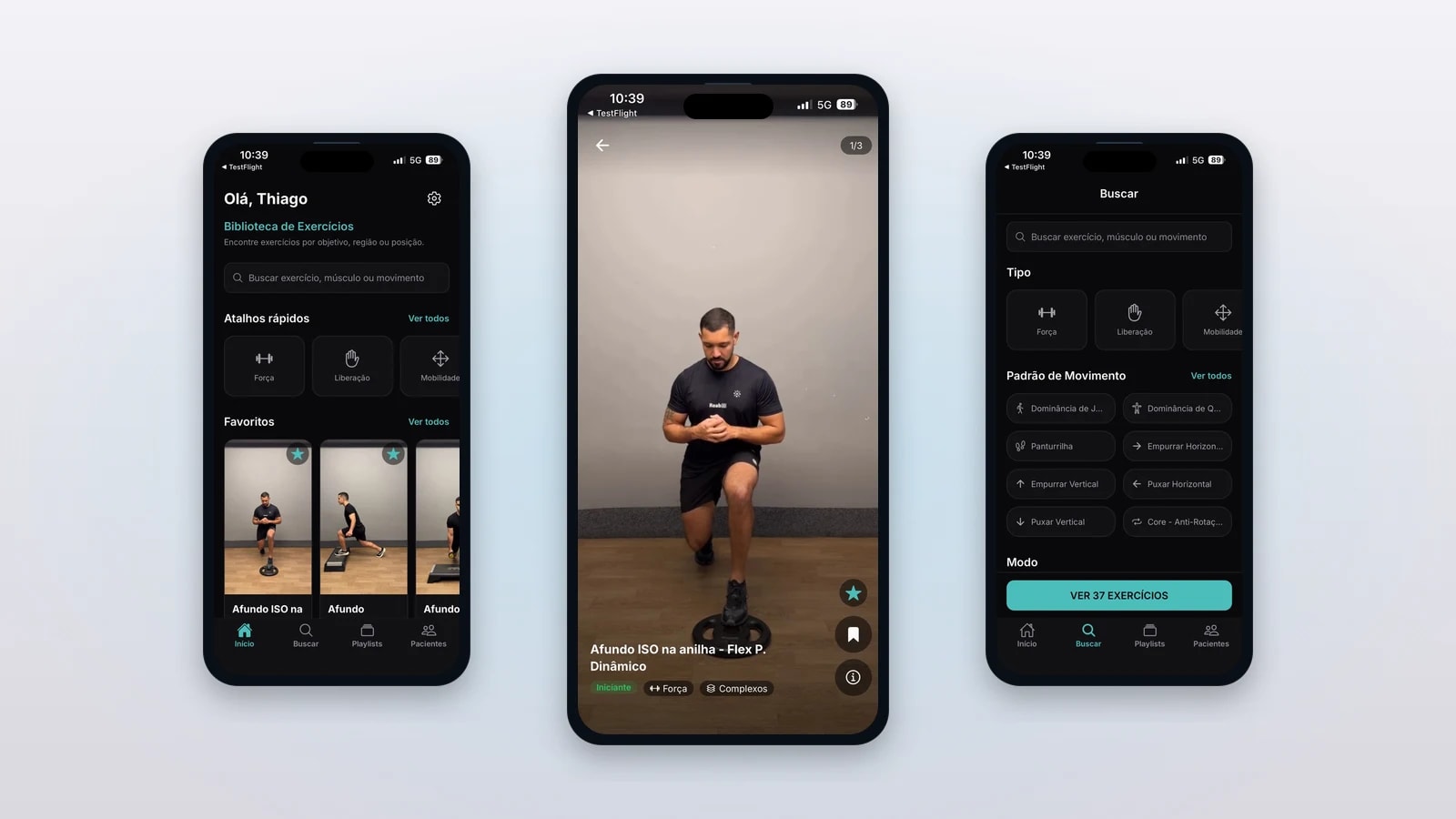
In the app, the professional moves between four tabs: Home, Search, Playlists and Patients. On the other side, the panel handles exercises, categories and accounts, plus payments, announcements and monitoring.
Search with combined filters
The Search tab works as a filter builder. Categories are grouped into sections such as type, movement pattern, mode, position, joint, resistance, equipment and sport.
As the professional selects filters, the button shows how many exercises match. In the results list, the applied filters stay visible and can be removed one by one.
That way, a case like a runner with knee pain becomes a combination of two filters instead of a long scroll through the library.
Full-screen video
Tapping an exercise opens the video full screen, muted and on loop. Swiping up moves to the next exercise in the list, in the vertical navigation people already know from social media.
The exercise actions sit on the side: favorite, save to a playlist and view the details, with duration, description and categories.
Playlists and patients
Professionals create playlists with a name and description, add exercises and reorder them by dragging.
The description holds the instructions, such as sets, reps and precautions, and is shown to whoever receives the playlist.
The Patients tab stores each patient or client along with the playlists linked to them, which makes it easy to pick up each person's prescription again.
Sharing with no app and no account
Every playlist has its own link, which the professional sends by WhatsApp, email or any other app.
The recipient opens the playlist in the browser on any device, phone or computer, and watches the videos in the set order, with the description the professional wrote. There's no app to download and no account to create.
Sign-in through WhatsApp
There's no password. The professional enters their WhatsApp number and receives a six-digit code to sign in.
On first access, the app asks for name, email and occupation. Older accounts, created with email and password, are linked to the number by confirming a code sent by email, keeping playlists, patients and favorites.
Selling access
Signing up is free and lets people explore the app from the inside. Videos, playlists and patients are unlocked with yearly access.
The purchase happens on a dedicated page, by Pix or card, in full or in installments. Once the payment is confirmed, access is unlocked on the account automatically, with no action from the team.
Admin panel
The web panel brings together content and operations management:
- Exercise uploads, with the video sent straight to the streaming service
- Two-level categories, with icon and order set by the team
- Management of professionals, administrators and access periods
- Payment tracking
- Push announcements sent right away or scheduled
- Technical logs and email history
Exercise recordings go through an editing robot that produces video drafts. Each draft only becomes an exercise after it is approved in the panel.
The panel was also adapted to work on phones, including creating and editing.
Support and announcements
The app has a WhatsApp button to reach support. The support number has an automated assistant that answers based on an app guide written in plain user language.
Push announcements are written in the panel and can open an exercise, the announcement list or a page. The app also keeps a history of those announcements.
Technical development
The app was built with React Native, from a single codebase for iPhone and Android, and connects to its own API and admin panel.
Improvements reach users through automatic updates, without waiting for a new store release for every adjustment.
Technologies used
- React Native
- Expo
- TypeScript
- iOS and Android app
- EAS Update
- Expo Notifications
- React Query
- Next.js
- Sequelize
- MariaDB
- Bunny Stream
- WhatsApp Cloud API
- Asaas
- Responsive admin panel
Keep reading
More case studies.
Next step
Want a project like this one?
Tell us what you need to build. We answer with a direction, not a generic quote.
No cost and no commitment.